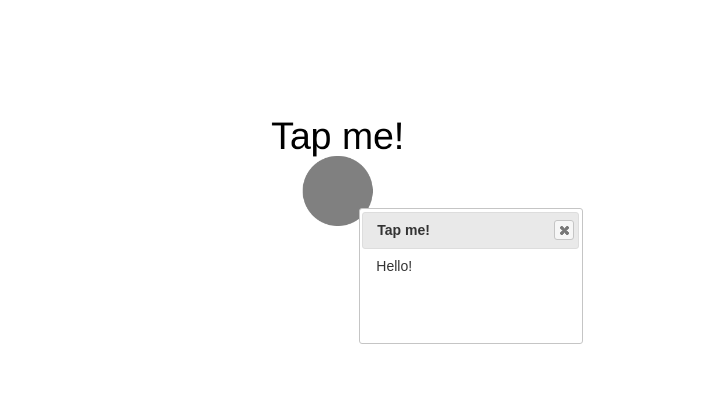
Popup
Popup demo showcases how to use the popup feature of nodes to show description about the nodes on clicking on them. You can construct this graph in graphspace_python by the following steps:
Importing necessary modules
You have to import the GSGraph
class to construct a graph and GraphSpace client
class to upload the graph to GraphSpace.
>>> from graphspace_python.graphs.classes.gsgraph import GSGraph
>>> from graphspace_python.api.client import GraphSpace
Initialize GraphSpace client
You have to initialize the GraphSpace client by providing your username and password.
>>> graphspace = GraphSpace('user1@example.com', 'user1')
Set name,tags and visibility status
Using the mothods of the GSGraph class you can set name, tags and visibility status for your newly created graph.
>>> G.set_name('Popup Demo')
>>> G.set_tags(['popup', 'graphspace', 'demo'])
>>> G.set_is_public()
Define meta-data
Meta data for the graph can be set in the following way:
>>> data = {
>>>     'description': 'This is a demo graph showing functionality of popup in GraphSpace.'
>>> }
>>> G.set_data(data)
Adding a node to the graph
You can add a node having an attribute popup, which can be any HTML formatted text you want to show when the node is clicked on.
>>> G.add_node('n', label='Tap me!', popup='Hello!')
Set styling for the node
You can assign style to the added node in the following manner:
>>> G.add_style('node', {
>>>     "content": "data(label)",
>>>     "background-color": "grey",
>>>     "text-valign": "top"
>>> })
Upload graph to GraphSpace
Finally, you can upload the graph to GraphSpace.
>>> graph = graphspace.post_graph(G)
>>> graph.url
'http://graphspace.org/graphs/32708'
This demo graph is already present on GraphSpace. You can view it at http://graphspace.org/graphs/22708